Wednesday, 11 January 2012

Fuji X10: dynamic range

Australian White Ibis, Threskiornis molucca. January 9, 2011 | flickr

The Queensland sometimes is called the sunshine state. Indeed, the sun is very bright here, with a lot of UV. This bring us to high contrast in outdoor scenes and high dynamic range. Very often in photos taken with compact cameras the clouds were overexposed and blown out. 

Here come the Fuji X10, a jewel of compacts. On the top is the resized SOOC JPEG (straight out of camera). The bird, Australian White Ibis, has white feathers and black skin, which is very challenging to photograph. This snapshot was made shortly after noon time, in Aperture priority mode, iso 200, at 12 megapixels. A small cloud had blocked the sun for a moment, which helped a lot. I am very impressed with the output. It is possible to tweak the image and made it even better but I want to post the unedited photo. Below, as usual, is 100% crop from the OOC JPEG.

Moreover, the camera has a dedicated high dynamic range mode, and I suspect the results can be even better.

Tuesday, 10 January 2012

Orbs are coming!


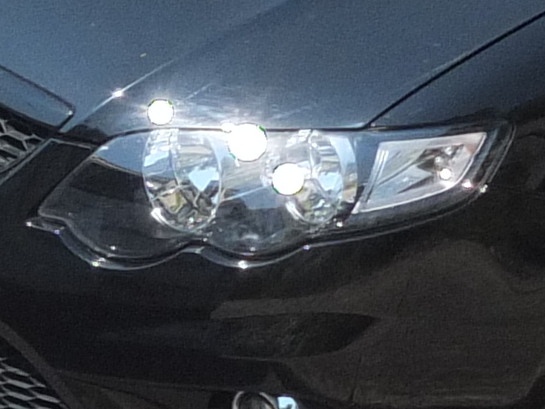
Yes, orbs are coming! See it yourself on the photo above. Don't be scared with the picture: it was made through the R72 infrared filter. It is first my image from the Fuji X10 in which white orbs are clearly visible.

Anyway, I decided to examine the white discs / orb issue on my own and took some pictures with the X10 in orbs-prone conditions. First, I made several shots in the room with the lamp turned on, at night time. There were no orbs. The highlights were blown as expected but there were no white disks with sharp border. The pictures were made at iso 100, at 12 megapixels.

Next, I went for car shooting in bright Australian sun. And the sun was very bright that day, and I was lucky. The picture below was taken at iso 100, at full resolution (4000x3000 pixels). You can click on it to see the resized version. The orbs are visible on the black car but the gray car looks fine. The white dot on the screen of the gray car probably can be the orb, too, but I would not bother about it. It looks more or less natural. Anyway, in such conditions the orbs present in nearly all photos of shiny (black) car.


Orbs shot at iso 100

In high iso shots with high dynamic range the orbs are smaller but still visible. It seems that it is possible to get somewhat better results with the smaller resolution (six megapixel mode).

Orbs shot at iso 400

100% crop from the iso 400 shot (above)

What can I say? I am glad that I bought the camera before emergence of the orbs story because now I can take pictures instead of weighting all pros and cons. For the photography I am doing the orbs are irrelevant. I have not seen orbs in any of my "nature" shots. The white discs "ruined" only one my photo out of more than 2,000. You can do a math :). The photography is my hobby, so a ruined image would not affect my livelihood. I practically do not print my photos. IMHO, in order to find the orbs in the iso 400 image displayed on a computer screen you need to know what to look for. The chromatic aberration (?) at the top of the windscreen is more pronounced than the white discs. Just show this picture to someone who has no knowledge of the white disc problem and ask what is wrong with the image. You might be surprised with the answer :-)

However, it is a real problem in certain circumstances. It does limit the camera usability for some people. It is a pity that the camera positioned (and priced) as a premium compact has such annoying issue.

Monday, 9 January 2012

Fujifilm X10: part 3 (after picture)

Beehive Ginger, Zingiber spectabile. January 9, 2012 | flickr

It seems that I have "love and hate" attitude towards the Fuji X10. It is joy to use, and it produces great images (= I like the photos) but yesterday even the spare battery went flat during shooting. Very inconvenient. It is only part of the story. Here is the rest of it. For some awkward reason the SD card from the X10 does not work with the card reader I have. Actually I have two card readers, and it used to work with the second one. Not anymore. So, the only way to copy the pictures from the camera to the computer is to connect the camera to the computer. But there is a catch, too: the Fuji X10 does not have a standard mini-USB port, so the cables I use to connect external hard drives or ebook reader cannot be used with the X10. And, on top of it, the camera must be turned on for connection! That's why I started with the flat batter issue. So, in order to copy the pictures on third party computer/storage I need to have the dedicated cable, camera charger and access to a power point. Think camping, for example.

I can charge my four-years old ebook reader through the standard mini-USB cable connected to a computer and can copy files in parallel.Why the same was not implemented in the advanced compact?

I don't know if the card issue is related to the non-brand SD card I have, card readers or the camera. The card reader works fine with the SD card from the ebook reader. The same card reader would not recognize the SD card from the camera if connected to the computer running under the Vista or XP. Two days ago I spend more than one hour in order to copy less than 20 images from the camera because the camera was not recognized  by the computer. Aghrrr...

The X10 is the first "SD card" camera I use, and I know people who have issues with the brand SD cards on Nikon DSLRs. So, I don't know how common "SD card" problems. I am long time Olympus user, and I don't recollect that any of my SM, xD or Compact Flash cards have similar issues. Olympus is also notorious for a proprietary cables for their cameras which was/is extremely inconvenient.

As for pictures from X10... This one was taken at iso 100, F7.1, on tripod. Below is 100% crop from the unedited image.